I got back from trip to Rome and Milan last Tuesday, this included the PPD10 workshop that Aaron, Lucia, Sri and I had organised, and the AVI 2008 conference, both in University of Rome “La Sapienza”, and a day workshop on Search Computing at Milan Polytechnic.
PPD10
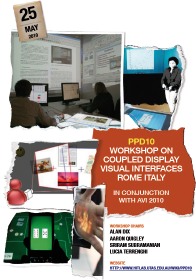 The PPD10 workshop on Coupled Display Visual Interfaces followed on from a previous event, PPD08 at AVI 2008 and also a workshop on “Designing And Evaluating Mobile Phone-Based Interaction With Public Displays” at CHI2008. The linking of public and private displays is something I’ve been interested in for some years and it was exciting to see some of the kinds of scenarios discussed at Lancaster as potential futures some years ago now being implemented over a range of technologies. Many of the key issues and problems proposed then are still to be resolved and new ones arising, but certainly it seems the technology is ‘coming of age’. As well as much work filling in the space of interactions, there were also papers that pushed some of the existing dimensions/classifications, in particular, Rasmus Gude’s paper on “Digital Hospitality” stretched the public/private dimension by considering the appropriation of technology in the home by house guests. The full proceedings are available at the PPD10 website.
AVI 2010
AVI is always a joy, and AVI 2010 no exception; a biennial, single-track conference with high-quality papers (20% accept rate this year), and always in lovely places in Italy with good food and good company! I first went to AVI in 1996 when it was in Gubbio to give a keynote “Closing the Loop: modelling action, perception and information“, and have gone every time since — I always say that Stefano Levialdi is a bit like a drug pusher, the first experience for free and ever after you are hooked! The high spot this year was undoubtedly Hitomi Tsujita‘s “Complete fashion coordinator”, a system for using social networking to help choose clothes to wear — partly just fun with a wonderful video, but also a very thoughtful mix of physical and digital technology.

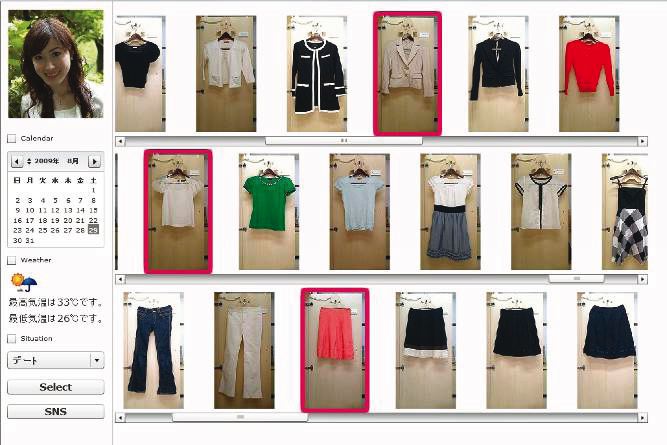
images from Complete Fashion Coordinator
The keynotes were all great, Daniel Keim gave a really lucid state of the art in Visual Analytics (more later) and Patrick Lynch a fresh view of visual understanding based on many years experience and highlighting particularly on some of the more immediate ‘gut’ reactions we have to interfaces. Daniel Wigdor gave an almost blow-by-blow account of work at Microsoft on developing interaction methods for next-generation touch-based user interfaces. His paper is a great methodological exemplar for researchers combining very practical considerations, more principled design space analysis and targeted experimentation.
Looking more at the detail of Daniel’s work at Microsoft, it is interesting that he has a harder job than Apple’s interaction developers. While Apple can design the hardware and interaction together, MS as system providers need to deal with very diverse hardware, leading to a ‘least common denominator’ approach at the level of quite basic touch interactions. For walk-up-and use systems such as Microsoft Surface in bar tables, this means that users have a consistent experience across devices. However, I did wonder whether this approach which is basically the presentation/lexical level of Seeheim was best, or whether it would be better to settle at some higher-level primitives more at the Seeheim dialog level, thinking particularly of the way the iPhone turns pull down menus form web pages into spinning selectors. For devices that people own it maybe that these more device specific variants of common logical interactions allow a richer user experience.
The complete AVI 2010 proceedings (in colour or B&W) can be found at the conference website.
The very last session of AVI was a panel I chaired on “Visual Analytics: people at the heart of data” with Daniel Keim, Margit Pohl, Bob Spence and Enrico Bertini (in the order they sat at the table!). The panel was prompted largely because the EU VisMaster Coordinated Action is producing a roadmap document looking at future challenges for visual analytics research in Europe and elsewhere. I had been worried that it could be a bit dead at 5pm on the last day of the conference, but it was a lively discussion … and Bob served well as the enthusiastic but also slightly sceptical outsider to VisMaster!
As I write this, there is still time (just, literally weeks!) for final input into the VisMaster roadmap and if you would like a draft I’ll be happy to send you a PDF and even happier if you give some feedback 🙂
Search Computing
I was invited to go to this one-day workshop and had the joy to travel up on the train from Rome with Stu Card and his daughter Gwyneth.
 The search computing workshop was organised by the SeCo project. This is a large single-site project (around 25 people for 5 years) funded as one of the EU’s ‘IDEAS Advanced Grants’ supporting ‘investigation-driven frontier research’. Really good to see the EU funding work at the bleeding edge as so many national and European projects end up being ‘safe’.
The term search computing was entirely new to me, although instantly brought several concepts to mind. In fact the principle focus of SeCo is the bringing together of information in deep web resources including combining result rankings; in database terms a form of distributed join over heterogeneous data sources.
The work had many personal connections including work on concept classification using ODP data dating back to aQtive days as well as onCue itself and Snip!t. It also has similarities with linked data in the semantic web word, however with crucial differences. SeCo’s service approach uses meta-descriptions of the services to add semantics, whereas linked data in principle includes a degree of semantics in the RDF data. Also the ‘join’ on services is on values and so uses a degree of run-time identity matching (Stu Card’s example was how to know that LA=’Los Angeles’), whereas linked data relies on URIs so (again in principle) matching has already been done during data preparation. My feeling is that the linking of the two paradigms would be very powerful, and even for certain kinds of raw data, such as tables, external semantics seems sensible.
One of the real opportunities for both is to harness user interaction with data as an extra source of semantics. For example, for the identity matching issue, if a user is linking two data sources and notices that ‘LA’ and ‘Los Angeles’ are not identified, this can be added as part of the interaction to serve the user’s own purposes at that time, but by so doing adding a special case that can be used for the benefit of future users.
While SeCo is predominantly focused on the search federation, the broader issue of using search as part of algorithmics is also fascinating. Traditional algorithmics assumes that knowledge is basically in code or rules and is applied to data. In contrast we are seeing the rise of web algorithmics where knowledge is garnered from vast volumes of data. For example, Gianluca Demartini at the workshop mentioned that his group had used the Google suggest API to extend keywords and I’ve seen the same trick used previously. To some extent this is like classic techniques of information retrieval, but whereas IR is principally focused on a closed document set, here the document set is being used to establish knowledge that can be used elsewhere. In work I’ve been involved with, both the concept classification and folksonomy mining with Alessio apply this same broad principle.
The slides from the workshop are appearing (but not all there yet!) at the workshop web page on the SeCo site.
 … and beginnings … in September (next week!) I also start to work part-time with Talis. Talis is a remarkable story. A library information systems company that re-invented itself as a Semantic Web company and now, amongst other things, powering the Linked Data at data.gov.uk.
