Alan’s blog

June 11, 2010

Phoenix rises – vfridge online again

Filed under: HCI and usability, academic, personal, web development — alan @ 7:47 pm

vfridge is back!

I mentioned ‘Project Phoenix’ in my last previous post, and this was it – getting vfridge up and running again.

Ten years ago I was part of a dot.com company aQtive1 with Russell Beale, Andy Wood and others.  Just before it folded in the aftermath of the dot.com crash, aQtive spawned a small spin-off vfridge.com.  The virtual fridge was a social networking web site before the term existed, and while vfridge the company went the way of most dot.coms, for some time after I kept the vfridge web site running on Fiona’s servers until it gradually ‘decayed’ partly due to Javascript/DOM changes and partly due to Java’s interactions with mysql becoming unstable (note very, very old Java code!).  But it is now back online :-)

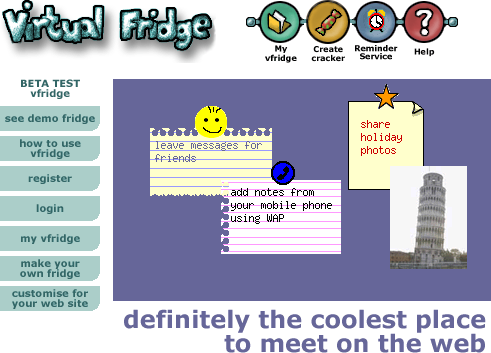
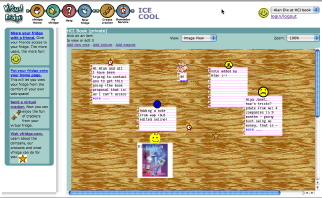
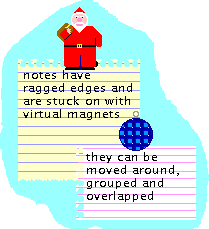
The core idea of vfridge is placing small notes, photos and ‘magnets’ in a shareable web area that can be moved around and arranged like you might with notes held by magnets to a fridge door.
Underlying vfridge was what we called the websharer vision, which looked towards a web of user-generated content.  Now this is passé, but at the time  was directly counter to accepted wisdom and looking back seem prescient – remember this was written in 1999:

Although everyone isn’t a web developer, it is likely that soon everyone will become an Internet communicator — email, PC-voice-comms, bulletin boards, etc. For some this will be via a PC, for others using a web-phone, set-top box or Internet-enabled games console.

The web/Internet is not just a medium for publishing, but a potential shared place.

Everyone may be a web sharer — not a publisher of formal public ‘content’, but personal or semi-private sharing of informal ‘bits and pieces’ with family, friends, local community and virtual communities such as fan clubs.

This is not just a future for the cognoscenti, but for anyone who chats in the pub or wants to show granny in Scunthorpe the baby’s first photos.

Just over a year ago I thought it would be good to write a retrospective about vfridge in the light of the social networking revolution.  We did a poster “Designing a virtual fridge” about vfridge years ago at a Computers and Fun workshop, but have never written at length abut its design and development.  In particular it would be good to analyse the reasons, technical, social and commercial, why it did not ‘take off’ the time.  However, it is hard to do write about it without good screen shots, and could I find any? (Although now I have)  So I thought it would be good to revive it and now you can try it out again. I started with a few days effort last year at Christmas and Easter time (leisure activity), but now over the last week have at last used the fact that I have half my time unpaid and so free for my own activities … and it is done :-)

The original vfridge was implemented using Java Servlets, but I have rebuilt it in PHP.  While the original development took over a year (starting down in Coornwall while on holiday watching the solar eclipse), this re-build took about 10 days effort, although of course with no design decisions needed.  The reason it took so much development back then is one of the things I want to consider when I write the retrospective.

As far as possible the actual behaviour and design is exactly as it was back in 2000 … and yes it does feel clunky, with lots of refreshing (remember no AJAX or web2.0 in those days) and of course loads of frames!  In fact there is a little cleverness that allowed some client-end processing pre-AJAX2.    Also the new implementation uses the same templates as the original one, although the expansion engine had to be rewritten in PHP.  In fact this template engine was one of our most re-used bits of Java code, although now of course many alternatives.  Maybe I will return to a discussion of that in another post.

I have even resurrected the old mobile interface.  Yes there were WAP phones even in 2000, albeit with tiny green and black screens.  I still recall the excitement I felt the first time I entered a note on the phone and saw it appear on a web page :-)   However, this was one place I had to extensively edit the page templates as nothing seems to process WML anymore, so the WML had to be converted to plain-text-ish HTML, as close as possible to those old phones!  Looks rather odd on the iPhone :-/

So, if you were one of those who had an account back in 2000 (Panos Markopoulos used it to share his baby photos :-) ), then everything is still there just as you left it!

If not, then you can register now and play.


  1. The old aQtive website is still viewable at aqtive.org, but don’t try to install onCue, it was developed in the days of Windows NT. [back]
  2. One trick used the fact that you can get Javascript to pre-load images.  When the front-end Javascript code wanted to send information back to the server it preloaded an image URL that was really just to activate a back-end script.  The frames  used a change-propagation system, so that only those frames that were dependent on particular user actions were refreshed.  All of this is preserved in the current system, peek at the Javascript on the pages.    Maybe I’ll write about the details of these another time. [back]

July 10, 2009

grammer aint wot it used two be

Filed under: HCI and usability, academic, personal, web development — alan @ 10:35 am

Fiona @ lovefibre and I have often discussed the worrying decline of language used in many comments and postings on the web. Sometimes people are using compressed txtng language or even leetspeak, both of these are reasonable alternative codes to ‘proper’ English, and potentially part of the natural growth of the language.  However, it is often clear that the cause is ignorance not choice.  One of the reasons may be that many more people are getting a voice on the Internet; it is not just the journalists, academics and professional classes.  If so, this could be a positive social sign indicating that a public voice is no longer restricted to university graduates, who, of course, know their grammar perfectly …

Earlier today I was using Google to look up the author of a book I was reading and one of the top links was a listing on ratemyprofessors.com.  For interest I clicked through and saw:

“He sucks.. hes mean and way to demanding if u wanan work your ass off for a C+ take his class1

Hmm I wonder what this student’s course assignment looked like?

(more…)


  1. In case you think I’m a complete pedant, personally, I am happy with both the slang ’sucks’ and ‘ass’ (instead of ‘arse’!), and the compressed speech ‘u’. These could be well-considered choices in language. The mistyped ‘wanna’ is also just a slip. It is the slightly more proper “hes mean and way to demanding” that seems to show  general lack of understanding.  Happily, the other comments, were not as bad as this one, but I did find the student who wanted a “descent grade” amusing :-) [back]

April 18, 2009

tech talks: brains, time and no time

Filed under: HCI and usability, academic, web development — alan @ 11:05 am

Just scanning a few Google Tech Talks on YouTube.  I don’t visit it often, but followed a link from Rob Style’s twitter.  I find the video’s a bit slow, so tend to flick through with the sound off, really wishing they had fast forward buttons like a DVD as quite hard to pull the little slider back and forth.

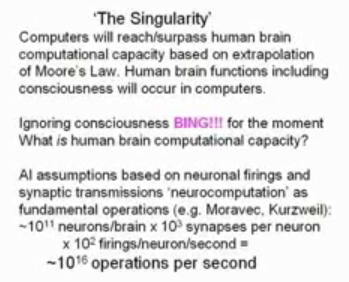
One talk was by Stuart Hameroff on A New Marriage of Brain and Computer.  He is the guy that works with Penrose on the possibility that quantum effects in microtubules may be the source of consciousness.  I notice that he used calculations for computational capacity based on traditional neuron-based models that are very similar to my own calculations some years ago in “the brain and the web” when I worked out that the memory and computational capacity of a single human brain is very similar to those of the entire web. Hameroff then went on to say that there are an order of magnitude more microtubules (sub-cellular structures, with many per neuron), so the traditional calculations do not hold!

Microtubules are fascinating things, they are like little mechano sets inside each cell.  It is these microtubules that during cell division stretch out straight the chromosomes, which are normally tangled up the nucleus.  Even stranger those fluid  movements of amoeba gradually pushing out pseudopodia, are actually made by mechanical structures composed of microtubules, only looking so organic because of the cell membrane – rather like a robot covered in latex.

pictire of amoeba

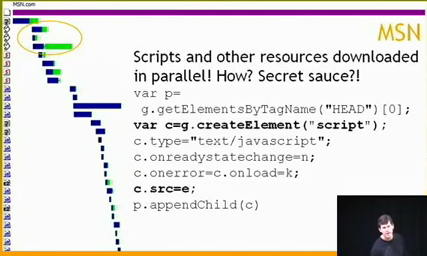
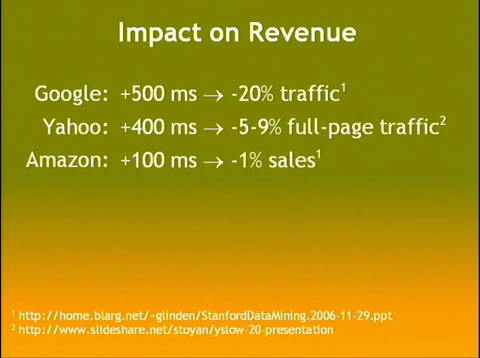
The main reason for going to the text talks was one by Steve Souders “Life’s Too Short – Write Fast Code” that has lots of tips for on speeding up web pages including allowing Javascript files to download in parallel.  I was particularly impressed by the quantification of costs of delays on web pages down to 100ms!

This is great.  Partly because of my long interest in time and delays in HCI. Partly because I want my own web scripts to be faster and I’ve already downloaded the Yahoo! YSlow plugin for FireFox that helps diagnose causes of slow pages.  And partly  because I get so frustrated waiting for things to happen, both on the web and on the desktop … and why oh why does it take a good minute to get a WiFi connection ….  and why doesn’t YouTube introduce better controls for skimming videos.

… and finally, because I’d already spent too much time skimming the tech talks, I looked at one last talk: David Levy, “No Time To Think” … how we are all so rushed that we have no time to really think about problems, not to mention life1.  At least that’s what I think it said, because I skimmed it rather fast.


  1. see also my own discussion of Slow Time [back]

March 23, 2009

Some lessons in extended interaction, courtesy Adobe

Filed under: HCI and usability, academic, web development — alan @ 11:59 am

I use various Adobe products, especially Dreamweaver and want to get the newest version of Creative Suite.  This is not cheap, even at academic prices, so you might think Adobe would want to make it easy to buy their products, but life on the web is never that simple!

As you can guess a number of problems ensued, some easily fixable, some demonstrating why effective interaction design is not trivial and apparently good choices can lead to disaster.

There is a common thread.  Most usability is focused on the time we are actively using a system – yes obvious – however, most of the problems I faced were about the extended use of the system, the way individual periods of use link together.  Issues of long-term interaction have been an interest of mine for many years1 and have recently come to the fore in work with Haliyana, Corina and others on social networking sites and the nature of ‘extended episodic experience’.  However, there is relatively little in the research literature or practical guidelines on such extended interaction, so problems are perhaps to be expected.

First the good bit – the Creative ‘Suite’  includes various individual Adobe products and there are several variants Design/Web, Standard/Premium, however there is a great page comparing them all … I was able to choose which version I needed, go to the academic purchase page, and then send a link to the research administrator at Lancaster so she could order it.  So far so good, 10 out of 10 for Adobe …

To purchase as an academic you quite reasonably have to send proof of academic status.  In the past a letter from the dept. on headed paper was deemed sufficient, but now they ask for a photo ID.  I am still not sure why this is need, I wasn’t going in in person, so how could a photo ID help?  My only photo ID is my passport and with security issues and identity theft constantly in the news, I was reluctant to send a fax of that (do US homeland security know that Adobe, a US company, are demanding this and thus weakening border controls?).

After double checking all the information and FAQs in the site, I decided to contact customer support …

Phase 1 customer support

The site had a “contact us” page and under “Customer service online”, there is an option “Open new case/incident”:

… not exactly everyday language, but I guessed this meant “send us a message” and proceeded. After a few more steps, I got to the enquiry web form and asked whether there was an alternative, or if I sent fax of the passport whether I could blot out the passport number and submitted the form.

Problem 1: The confirmation page did not say what would happen next.  In fact they send an email when the query is answered, but as I did not know that, so I had to periodically check the site during the rest of the day and the following morning.

Lesson 1: Interactions often include ‘breaks’, when things happen over a longer period.  When there is a ‘beak’ in interaction, explain the process.

Lesson 1 can be seen as a long-term equivalent of standard usability principles to offer feedback, or in Nielsen’s Heuristics “Visibility of system status”, but this design advice is normally taken to refer to immediate interactions and what has already happened, not about what will happen in the longer term.  Even principles of ‘predictability’ are normally phrased in knowing what I can do to the system and how it will respond to my actions, but not formulated clearly for when the system takes autonomous action.

In terms of status-event analysis, they quite correctly gave me an generated an interaction event for me (the mail arriving) to notify me of the change of status of my ‘case’.  It was just that the hadn’t explained that is what they were going to do.

Anyway the next day the email arrived …

Problem 2: The mail’s subject was “Your customer support case has been closed”.  Within the mail there was no indication that the enquiry had actually been answered (it had), nor a link to the the location on the site to view the ‘case’ (I had to login and navigate to it by hand), just a general link to the customer ’support’ portal and a survey to convey my satisfaction with the service (!).

Lesson 2.1: The email is part of the interaction. So apply ‘normal’ interaction design principles, such as Nielsen’s “speak the users’ language” – in this case “case has been closed” does not convey that it has been dealt with, but sounds more like it has been ignored.

Lesson 2.2: Give clear information in the email – don’t demand a visit to the site. The eventual response to my ‘case’ on the web site was entirely textual, so why not simply include it in the email?  In fact, the email included a PDF attachment, that started off identical to the email body and so I assumed was a copy of the same information … but turned out to have the response in it.  So they had given the information, just not told me they had!

Lesson 2.3: Except where there is a security risk – give direct links not generic ones. The email could easily have included a direct link to my ‘case’ on the web site, instead I had to navigate to it.  Furthermore the link could have included an authentication key so that I wouldn’t have to look up my Adobe user name and password (I of course needed to create a web site login in order to do a query).

In fact there are sometimes genuine security reasons for sometimes NOT doing this.  One is if you are uncertain of the security of the email system or recipient address, but in this case Adobe are happy to send login details by email, so clearly trust the recipient. Another is to avoid establishing user behaviours that are vulnerable to ‘fishing’ attacks.  In fact I get annoyed when banks send me emails with direct links to their site (some still do!), rather than asking you to visit the site and navigate, if users get used to navigating using email links then entering login credentials this is an easy way for malicious emails to harvest personal details. Again in this case Adobe had other URLs in the email, so this was not their reason.  However, if they had been …

Lesson 2.4: If you are worried about security of the channel, give clear instructions on how to navigate the site instead of a link.

Lesson 2.5: If you wish to avoid behaviour liable to fishing, do not include direct links to your site in emails.  However, do give the user a fast-access reference number to cut-and-paste into the site once they have navigated to the site manually.

Lesson 2.6: As a more general lesson understand security and privacy risks.  Often systems demand security procedures that are unnecessary (forcing me to re-authenticate), but omit the ones that are really important (making me send a fax of my passport).

Eventually I re-navigate the Adobe site and find the details of my ‘case’ (which was also in the PDF in the email if I had realised).

Problem 3: The ‘answer’ to my query was a few sections cut-and-pasted from the academic purchase FAQ … which I had already read before making the enquiry.  In particular it did not answer my specific question even to say “no”.

Lesson 3.1: The FAQ sections could easily have been identified automatically the day before. If there is going to be  delay in human response, where possible offer an immediate automatic response. If this includes a means to say whether this has answered the query, then human response may not be needed (saving money!) or at least take into account what the user already knows.

Lesson 3.2: For human interactions – read what the user has said. Seems like basic customer service … This is a training issue for human operators, but reminds us that:

Lesson 3.3: People are part of the system too.

Lesson 3.4: Do not ‘close down’ an interaction until the user says they are satisfied. Again basic customer service, but whereas 3.2 is a human training issue, this is about the design of the information system: the user needs some way to say whether or not the answer is sufficient.  In this case, the only way to re-open the case is to ring a full-cost telephone support line.

Phase 2 customer feedback survey

As I mentioned, the email also had a link to a web survey:

In an effort to constantly improve service to our customers, we would be very
interested in hearing from you regarding our performance.  Would you be so
kind to take a few minutes to complete our survey?   If so, please click here:

Yes I did want to give Adobe feedback on their customer service! So I clicked the link and was taken to a personalised web survey.  I say ‘personalised’ in that the link included a reference to the customer support case number, but thereafter the form was completely standard  and had numerous multi-choice questions completely irrelevant to an academic order.  I lost count of the pages, each with dozens of tick boxes, I think around 10, but may have been more … and certainly felt like more.  Only on the last page was there a free-text area where I could say what was the real problem. I only persevered because I was already so frustrated … and was more so by the time I got to the end of the survey.

Problem 4: Lengthy and largely irrelevant feedback form.

Lesson 4.1: Adapt surveys to the user, don’t expect the user to adapt to the survey! The ‘case’ originated in the education part of the web site, the selections I made when creating the ‘case’ narrowed this down further to a purchasing enquiry; it would be so easy to remove many of the questions based on this. Actually if the form had even said in text “if your support query was about X, please answer …” I could then have known what to skip!

Lesson 4.2: Make surveys easy for the user to complete: limit length and offer fast paths. If a student came to me with a questionnaire or survey that long I would tell them to think again.  If you want someone to complete a form it has to be easy to do so – by all means have longer sections so long as the user can skip them and get to the core issues. I guess cynically making customer surveys difficult may reduce the number of recorded complaints ;-)

Phase 3 the order arrives

Back to the story: the customer support answer told me no more than I knew before, but I decided to risk faxing the passport (with the passport number obscured) as my photo ID, and (after some additional phone calls by the research administrator at Lancaster!), the order was placed and accepted.

When I got back home on Friday, the box from Adobe was waiting :-)

I opened the plastic shrink-wrap … and only then noticed that on the box it said “Windows” :-(

I had sent the research adminstrator a link to the product, so had I accidentally sent a link to the Windows version rather than the Mac one?  Or was there a point later in the purchasing dialogue where she had had to say which OS was required and not realised I used a Mac?

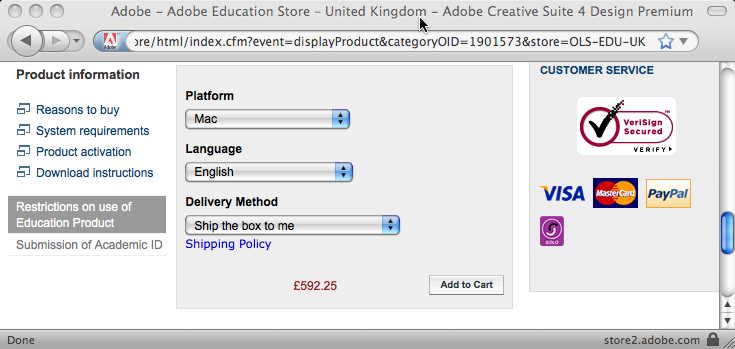
I went back to my mail to her and clicked the link:

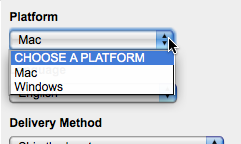
The “Platform” field clearly says “Mac”, but it is actually a selection field:

It seemed odd that the default value was “Mac” … why not “CHOOSE A PLATFORM”, I wondered if it was remembering a previous selection I had made, so tried the URL in Safari … and it looked the same.

… then I realised!

The web form was being ‘intelligent’ and had detected that I was on a Mac and so set the field to “Mac”.  I then sent the URL to the research administrator and on her Windows machine it will have defaulted to “Windows”.  She quite sensibly assumed that the URL I sent her was for the product I wanted and ordered it.

In fact offering smart defaults is  good web design advice, so what went wrong here?

Problem 5: What I saw and what the research administrator saw were different, leading to ordering the wrong product.

Lesson 5.1: Defaults are also dangerous. If there are defaults the user will probably agree to them without realising there was a choice.  We are talking about a £600 product here, that is a lot of room for error.  For very costly decisions, this may mean not having defaults and forcing the user to choose, but maybe making it easy to choose the default (e.g. putting default at top of a menu).

Lesson 5.2: If we decide the advantages of the default outweigh the disadvantages then we need to make defaulted information obvious (e.g. highlight, special colour) and possibly warn the user (one of those annoying “did you really mean” dialogue boxes! … but hey for £600 may be worth it).  In the case of an e-commerce system we could even track this through the system and keep inferred information highlighted (unless explicitly confirmed) all the way through to the final order form. Leading to …

Lesson 5.3: Retain provenance.  Automatic defaults are relatively simple ‘intelligence’, but as more forms of intelligent interaction emerge it will become more and more important to retain the provenance of information – what came explicitly from the user, what was inferred and how.  Neither current database systems nor emerging semantic web infrastructure make this easy to achieve internally, so new information architectures are essential.  Even if we retain this information, we do not yet fully understand the interaction and presentation mechanisms needed for effective user interaction with inferred information, as this story demonstrates!

Lesson 5.4: The URL is part of the interaction2.  I mailed a URL believing it would be interpreted the same everywhere, but in fact its meaning was relative to context.  This can be problematic even for ‘obviously’ personalised pages like a Facebook home page which always comes out as your own home page, so looks different.  However, it is essential when someone might want to bookmark, or mail the link.

This last point has always been one of the problems with framed sites and is getting more problematic with AJAX.  Ideally when dynamic content changes on the web page the URL should change to reflect it.  I had mistakenly thought this impossible without forcing a page reload, until I noticed that the multimap site does this.

The map location at the end of the URL changes as you move around the map.  It took me still longer to work out that this is accomplished because changing the part of the URL after the hash (sometimes called the ‘fragment’ and accessed in Javascript via location.hash) does not force a page reload.

If this is too complicated then it is relatively easy to use Javascript to update some sort of “use this link” or “link to this page” both for frame-based sites or those using web form elements or even AJAX. In fact, multimap does this as well!

Lesson 5.5: When you have dynamic page content update the URL or provide a “link to this page” URL.

Extended interaction

Some of these problems should have been picked up by normal usability testing. It is reasonable to expect problems with individual web sites or low-budget sites of small companies or charities.  However, large corporate sites like Adobe or central government have large budgets and a major impact on many people.  It amazes and appals me how often even the simplest things are done so sloppily.

However, as mentioned at the beginning, many of the problems and lessons above are about extended interaction: multiple visits to the site, emails between the site and the customer, and emails between individuals.  None of my interactions with the site were unusual or complex, and yet there seems to be a systematic lack of comprehension of this longer-term picture of usability.

As noted also at the beginning, this is partly because there is scant design advice on such interactions.  Norman has discussed “activity centred design“, but he still focuses on the multiple interactions within a single session with an application.  Activity theory takes a broader and longer-term view, but tends to focus more on the social and organisational context whereas the story here shows there is also a need for detailed interaction design advice.  The work I mentioned with Haliyana and Corina has been about the experiential aspects of extended interaction, but the problems on the Adobe were largely at a functional level (I never got so far as appreciating an ‘experience’ except a bad one!). So there is clearly much more work to be done here … any budding PhD students looking for a topic?

However, as with many things, once one thinks about the issue, some strategies for effective design start to become obvious.

So as a last lesson:

Overall Lesson: Think about extended interaction.


  1. My earliest substantive work on long-term interaction was papers at HCI 1992 and 1994 on”Pace and interaction” and “Que sera sera – The problem of the future perfect in open and cooperative systems“, mostly focused on communication and work flows.  The best summative work on this strand is in a 1998  journal paper “Interaction in the Large” and a more recent book chapter “Trigger Analysis – understanding broken tasks“ [back]
  2. This is of course hardly new, although neither address the particular problems here, see Nielsen’s “URL as UI” and James Gardner’s “Best Practice for Good URL Structures” for expostions of the general principle. Many sites still violate even simple design advice like W3C’s “Cool URIs don’t change“.  For example, even the BCS’ eWIC series of electronic proceedings, have URLs of the form “www.bcs.org/server.php?show=nav.10270“; it is hard to believe that “show=nav.10270″ will persist beyond the next web site upgrade :-( [back]

January 8, 2009

Backwards compatibility on the web

Filed under: HCI and usability, web development — alan @ 10:46 am

I just noticed the following excerpt in the web page describing a rich-text editing component:

Supported Browsers (Confirmed)
… list …

Note: This list is now out of date and some new browsers such as Safari 3.0+ and Opera 9.5+ suffer from some issues.
(Free Rich Text Editor – www.freerichtexteditor.com)

In odd moments I have recently been working on bringing vfridge back to life.  Partly this is necessary because the original Java Servlet code was such a pig1, but partly because the dynamic HTML code had ‘died’. To be fair vfridge was produced in the early days of DHTML, and so one might expect things to change between then and now. However, reading the above web page about a component produced much more recently, I wonder why is it that on the web, and elsewhere, we are so bad at being backward compatible … and I recall my own ‘pain and tears‘ struggling with broken backward compatibility in office 2008.

I’d started looking at current  rich text editors after seeing Paul James’ “Small, standards compliant, Javascript WYSIWYG HTML control“.  Unlike many of the controls that seem to produce MS-like output with <font> tags littered randomly around, Paul’s control emphasises standards compliance in HTML, and is using the emerging de-facto designMode2 support in browsers.

This seems good, but one wonders how long these standards will survive, especially the de facto one, given past history; will Paul James’ page have a similar notice in a year or two?

The W3C approach … and a common institutional one … is to define unique standards that are (intended to be) universal and unchanging, so that if we all use them everything will still work in 10,000 years time.  This is a grand vision, but only works if the standards are sufficiently:

  1. expressive so that everything you want to do now can be done (e.g. not deprecating the use of tables for layout in the absence of design grids leading to many horrible CSS ‘hacks’)
  2. omnipotent so that everyone (MS, Apple) does what they are told
  3. simple so that everyone implements it right
  4. prescient so that all future needs are anticipated before multiple differing de facto ’standards’ emerge

The last of those is the reason why vfridge’s DHTML died, we wanted rich client-side interaction when the stable standards were not much beyond transactions; and this looks like the reason many rich-text editors are struggling now.

A completely different approach (requiring a  degree of humility from standards bodies) would be to accept that standards always fall behind practice, and design this into the standards themselves.  There needs to be simple (and so consistently supported) ways of specifying:

  • which versions of which browsers a page was designed to support – so that browsers can be backward or cross-browser compliant
  • alternative content for different browsers and versions … and no the DTD does not do this as different versions of browsers have different interpretations of and bugs in different HTML variants.  W3C groups looking at cross-device mark-up already have work in this area … although it may fail the simplicty test.

Perhaps more problematically, browsers need to commit to being backward compatible where at all possible … I am thinking especially of the way IE fixed its own broken CSS implementation, but did so in a way that broke all the standard hacks that had been developed to work around the old bugs!  Currently this would mean fossilising old design choices and even old bugs, but if web-page meta information specified the intended browser version, the browser could selectively operate on older pages in ways compatible with the older browsers whilst offering improved behaviour for newer pages.


  1. The vfridge Java Servlets used to run fine, but over time got worse and worse; as machines got faster and JVM versions improved with supposedly faster byte-code compilers, strangely the same code got slower and slower until it now only produces results intermittently … another example of backward compatibility failing. [back]
  2. I would give a link to designMode except that I notice everyone else’s links seem to be broken … presumably MSDN URLs are also not backwards compatible :-( Best bet is just Google “designMode” [back]

November 17, 2008

web ephemera and web privacy

Filed under: HCI and usability, academic, web development — alan @ 10:01 am

Yesterday I was twittering about a web page I’d visited on the BBC1 and the tweet also became my Facebook status2.  Yanni commented on it, not because of the content of the link, but because he noticed the ‘is.gd’ url was very compact.  Thinking about this has some interesting implications for privacy/security and the kind of things you might to use different url shortening schemes for, but also led me to develop an interesting time-wasting application ‘LuckyDip‘ (well if ‘develop’ is the right word as it was just 20-30 mins hacking!).

I used the ‘is.gd’ shortening because it was one of three schemes offered by twirl, the twitter client I use.  I hadn’t actually noticed that it was significantly shorter than the others or indeed tinyurl, which is what I might have thought of using without twirl’s interface.

Here is the url of this blog <http://www.alandix.com/blog/> shortened by is.gd and three other services:

snurl:   http://snurl.com/5ot5k
twurl:  http://twurl.nl/ftgrwl
tinyurl:  http://tinyurl.com/5j98ao
is.gd:  http://is.gd/7OtF

The is.gd link is small for two reasons:

  1. ‘is.gd’ is about as short as you can get with a domain name!
  2. the ‘key’ bit after the domain is only four characters as opposed to 5 (snurl) or 6 (twurl, tinyurl)

The former is just clever domain choice, hard to get something short at all, let alone short and meaningful3.

The latter however is as a result of a design choice at is.gd.  The is.gd urls are allocated sequentially, the ‘key’ bit (7OtF) is simply an encoding of the sequence number that was allocated.  In contrast tinyurl seems to do some sort of hash either of the address or maybe of a sequence number.

The side effect of this is that if you simply type in a random key (below the last allocated sequence number) for an is.gd url it will be a valid url.  In contrast, the space of tinyurl is bigger, so ‘in principle’ only about one in a hundred keys will represent real pages … now I say ‘in principle’ because experimenting with tinyurl I find every six character seqeunce I type as a key gets me to a valid page … so maybe they do some sort of ‘closest’ match.

Whatever url shortening scheme you use by their nature the shorter url will be less redundant than a full url – more ‘random’ permutations will represent meaningful items.  This is a natural result of any ‘language’, the more concise you are the less redundant the language.

At a practical level this means that if you use a shortened url, it is more likely that someone  typing in a random is.gd (or tinyurl) key will come across your page than if they just type a random url.  Occasionally I upload large files I want to share to semi-private urls, ones that are publicly available, but not linked from anywhere.  Because they are not linked they cannot be found through search engines and because urls are long it would be highly unlikely that someone typing randomly (or mistyping) would find them.

If however, I use url shortening to tell someone about it, suddenly my semi-private url becomes a little less private!

Now of course this only matters if people are randomly typing in urls … and why would they do such a thing?

Well a random url on the web is not very interesting in general, there are 100s of millions and most turn out to be poor product or hotel listing sites.  However, people are only likely to share interesting urls … so random choices of shortened urls are actually a lot more interesting than random web pages.

So, just for Yanni, I spent a quick 1/2 hour4 and made a web page/app ‘LuckyDip‘.  This randomly chooses a new page from is.gd every 20 seconds – try it!


successive pages from LuckyDip

Some of the pages are in languages I can’t read, occasionally you get a broken link, and the ones that are readable, are … well … random … but oddly compelling.  They are not the permanently interesting pages you choose to bookmark for later, but the odd page you want to send to someone … often trivia, news items, even (given is.gd is in a twitter client) the odd tweet page on the twitter site.  These are not like the top 20 sites ever, but the ephemera of the web – things that someone at some point thought worth sharing, like overhearing the odd raised voice during a conversation in a train carriage.

Some of the pages shown are map pages, including ones with addresses on … it feels odd, voyeuristic, web curtain twitching – except you don’t know the person, the reason for the address; so maybe more like sitting watching people go by in a crowded town centre, a child cries, lovers kiss, someone’s newspaper blows away in the wind … random moments from unknown lives.

In fact most things we regard as private are not private from everyone.  It is easy to see privacy like an onion skin with the inner sanctum, then those further away, and then complete strangers – the further away someone is from ‘the secret’ the more private something is.  This is certainly the classic model in military security.  However, think further and there are many things you would be perfectly happy for a complete stranger to know, but maybe not those a little closer, your work colleagues, your commercial competitors.  The onion sort of reverses, apart from those that you explicitly want to know, in fact the further out of the onion, the safer it is.  Of course this can go wrong sometimes, as Peter Mandleson found out chatting to a stranger in a taverna (see BBC blog).

So I think LuckyDip is not too great a threat to the web’s privacy … but do watch out what you share with short urls … maybe the world needs a url lengthening service too …

And as a postscript … last night I was trying out the different shortening schemes available from twirl, and accidentally hit return, which created a tweet with the ‘test’ short url in it.  Happily you can delete tweets, and so I thought I had eradicated the blunder unless any twitter followers happened to be watching at that exact moment … but I forgot that my twitter feed also goes to my Facebook status and that deleting the tweet on twitter did not remove the status, so overnight the slip was my Facebook status and at least one person noticed.

On the web nothing stays secret long, and if anything is out there, it is there for ever … and will come back to hant you someday.


  1. This is the tweet “Just saw http://is.gd/7Irv Sad state of the world is that it took me several paragraphs before I realised it was a joke.” [back]
  2. I managed to link them up some time ago, but cannot find again the link on twitter that enabled this, so would be stuck if I wanted to stop it! [back]
  3. anyone out there registering Bangaldeshi domains … if ‘is’ is available!! [back]
  4. yea it should ave been less, but I had to look up how to access frames in javascript, etc. [back]

January 1, 2008

puzzle with pictures

Filed under: personal, web development — alan @ 9:41 pm

As it was new Years Day and it was too wet to go shift earth in the garden I thought I’d play a bit with Professor Alan’s puzzle square. I’ve had a ‘make your own’ version for years, but you had to chop an image into bits give them special names, etc. Now it works much more easily with any image (try it yourself). This are a couple I made with my own photos:


The key is that it is I am now using the CSS clip property which allows you to show selected parts of an image (or in fact any HTML element). This was made a little more complicated due to the fact that the W3C pages for clip give running examples for every other kind of visual effect … but not clip! Googling was a nightmare as it turns up page after page in forums saying “I can’t get clip to work”!

Happily I found seifi.org (a blog that looks like a really great web resource) and a post on Creating Thumbnails Using the CSS Clip Property. This was full of meticulously laid out examples … Mojo Seifi, you are a star!

(more…)

Powered by WordPress